
Ever wondered what happens after someone clicks on your website? Do they stick around, explore, or bounce faster than a rugby ball at a Highveld thunderstorm? If your website feels like a black box, it’s time to shine a light on its performance! The secret weapon? Understanding website analytics.
Yes, we’re diving into the fascinating world of data, specifically focusing on Google Analytics basics. Think of it as your website’s heartbeat monitor, telling you everything from who’s visiting to what they love (or don’t!). For any business, especially those aiming to dominate the digital landscape in vibrant South Africa, knowing how to interpret these insights is not just helpful – it’s absolutely crucial. So, grab your virtual magnifying glass; Z Web&Co is here to make analytics fun, actionable, and less intimidating than a Drakensberg peak!
What is Website Analytics, and Why Should I Care?
At its core, website analytics is the process of collecting, measuring, analyzing, and reporting web data to understand and optimize web usage. It’s like having a dedicated team quietly observing every single visitor to your site, noting their journey, interests, and exit points.
Why should you care? Because without understanding website analytics, you’re making decisions in the dark. You wouldn’t drive your car without a dashboard, would you? Analytics provides your website’s dashboard, showing you:
- Who your visitors are (demographics, location).
- How they found your site (search engines, social media, direct).
- What they do once they’re there (pages visited, time on site).
- When they visit (peak hours/days).
- Where they leave (bounce rate, exit pages).
This data is gold! It empowers you to refine your content, improve your user experience, supercharge your SEO, and ultimately, convert more visitors into loyal customers. It’s the difference between guessing and truly knowing what your online audience wants.
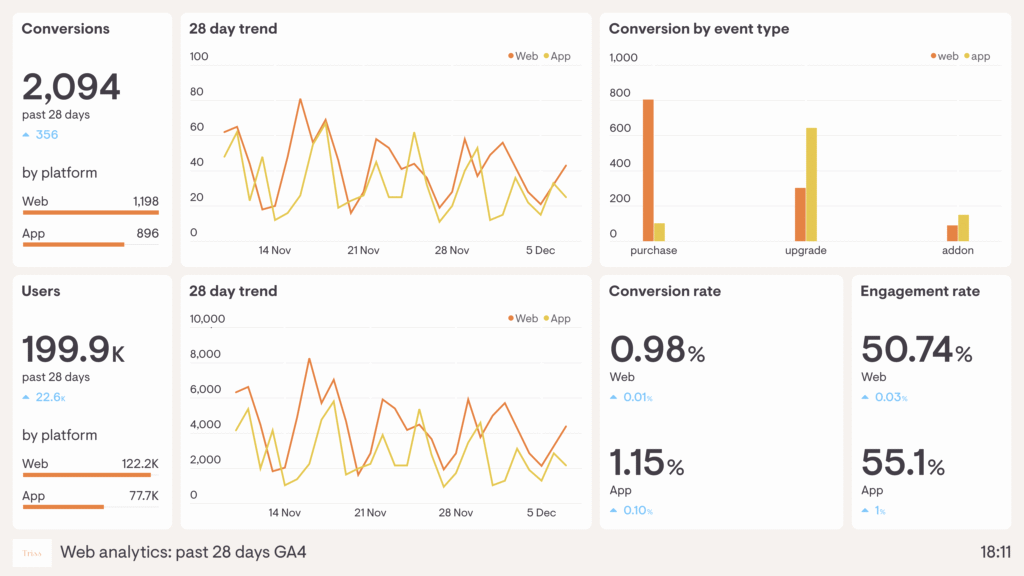
Why is Google Analytics Important for My Business?
Google Analytics (GA) isn’t just a tool; for many, it’s the tool. As a free, robust platform provided by Google, it integrates seamlessly with other Google services (like Search Console and Google Ads), offering unparalleled insights into your website’s performance. For businesses across South Africa, from a bustling e-commerce store in Cape Town to a local service provider in Polokwane, GA helps answer critical questions:
- Are my marketing efforts working? See which campaigns drive the most traffic and conversions.
- Is my website user-friendly? Identify pages with high bounce rates or low engagement.
- Who is my audience? Understand their demographics, interests, and geographical location.
- What content resonates? Discover your most popular pages and products.
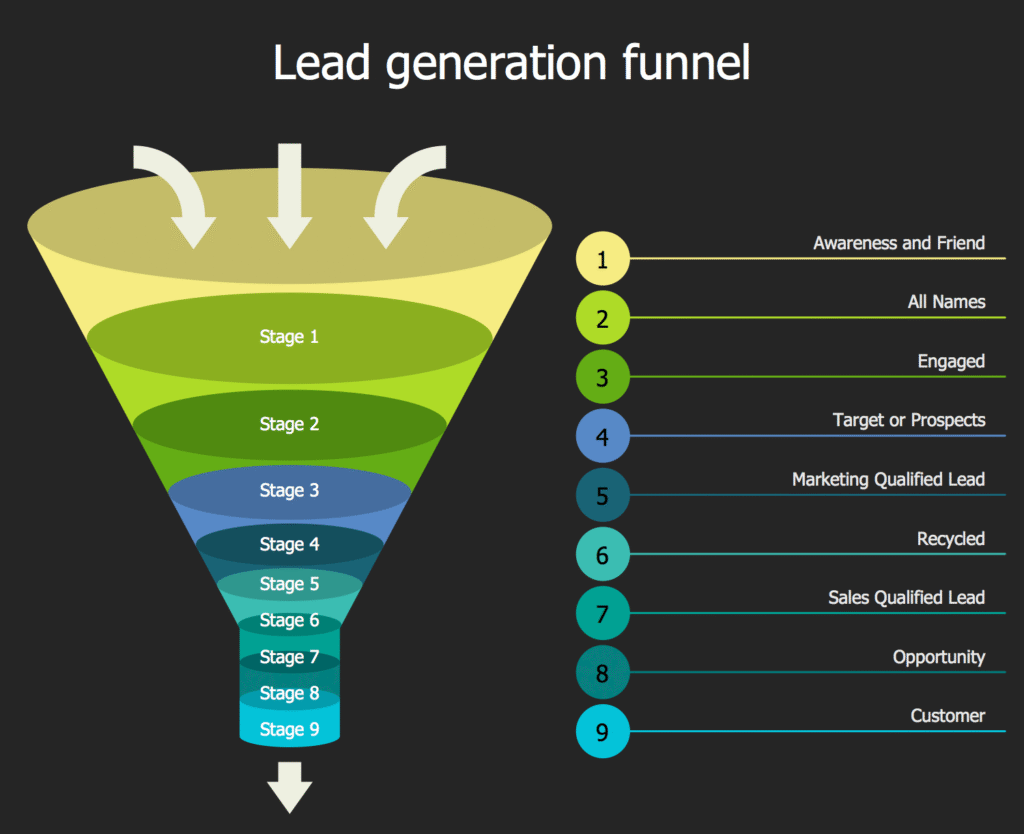
- Where are the bottlenecks? Pinpoint where users drop off in your conversion funnels.
Ultimately, Google Analytics empowers you to make informed, data-driven decisions that translate into a better user experience, improved search engine rankings, and a healthier bottom line. This is precisely why Z Web&Co integrates analytics into every web development and marketing strategy!
Navigating the Dashboard: What Are the Key Metrics in Google Analytics?
Diving into Google Analytics for the first time can feel like walking into a massive data warehouse. Don’t worry; we’ll focus on the essential sections and metrics that provide the most immediate value for understanding website analytics.
1. Audience Reports: Who are your visitors?
- Users: The number of unique visitors to your site.
- New Users: First-time visitors.
- Demographics: Age, gender, interests.
- Geo (Location): Where in the world (or specifically, South Africa!) your visitors are coming from. This is GOLD for local SEO!
- Technology: What devices (desktop, mobile), browsers, and operating systems they use. (Crucial for ensuring your site is responsive!)
2. Acquisition Reports: How did they find you?
- Channels: Groups traffic by source (Organic Search, Social, Direct, Referral, Paid Search).
- Source/Medium: More granular detail (e.g., google/organic, facebook.com/referral).
- Keywords: (Primarily from Google Search Console integration) Shows actual search queries used to find your site.
- Campaigns: Tracks specific marketing campaigns you’ve run (if properly tagged).
3. Behavior Reports: What did they do on your site?
- Page Views: Total number of pages viewed.
- Unique Page Views: Number of sessions during which the specified page was viewed at least once.
- Avg. Session Duration: How long visitors typically spend on your site.
- Bounce Rate: The percentage of single-page sessions (visitors who leave your site from the entrance page without interacting further). A high bounce rate often signals a problem with content relevance or user experience.
- Exit Pages: The last pages visitors viewed before leaving your site.
- Site Content: Shows your most popular pages.
4. Conversion Reports: Did they do what you wanted?
- Goals: Track specific actions (e.g., form submissions, newsletter sign-ups, downloads, purchases). Setting up goals is absolutely essential for measuring success!
- E-commerce: For online stores, this tracks transactions, revenue, product performance, and more.

The Setup Squad: How Do I Set Up Google Analytics? (GA4 Basics)
Setting up Google Analytics (specifically Google Analytics 4, the latest version) is a fairly straightforward process, but getting it right from the start is important.
- Create a Google Account: If you don’t have one, you’ll need a Google account (Gmail, etc.) to get started.
- Go to Google Analytics: Visit analytics.google.com and click “Start measuring.”
- Account Setup: Give your account a name and configure data sharing settings.
- Property Setup (GA4): Name your property and importantly, set your reporting time zone and currency (essential for accurate local reporting if you are targeting the South African Rand).
- Data Stream: Choose “Web” and enter your website URL. Enhanced measurement will automatically track things like page scrolls and outbound clicks.
- Installation: You’ll get a “Measurement ID” and installation instructions. The easiest way for most websites (especially those built by Z Web&Co with modern platforms) is to use Google Tag Manager or a specific GA plugin to deploy the GA4 tag.
Pro Tip from Z Web&Co: This setup can feel a bit technical, but getting it right is crucial. Our team regularly assists South African businesses with seamless Google Analytics integration, ensuring all your valuable data is captured accurately from day one!
Beyond the Basics: How Can I Use Google Analytics to Improve My Website?
Now for the fun part: turning raw data into actionable strategies! With a solid grasp of Google Analytics basics, you can start optimizing.
1. Improve Content Strategy:
- Popular Pages: Look at your “Pages and Screens” report. What content gets the most views? Create more of that!
- Low Engagement/High Bounce Pages: Are certain pages causing people to leave quickly? Perhaps the content isn’t relevant, the design is poor, or the call to action is missing. Revamp them!
- Internal Search: If you have an internal search bar, see what users are searching for on your site. This reveals unmet content needs.
2. Enhance User Experience (UX):
- Device Usage: If most of your visitors are on mobile (and they often are in South Africa!), ensure your site is lightning-fast and perfectly responsive.
- Navigation Flow: Use “Path exploration” reports in GA4 to understand how users move through your site. Are they finding key information easily?
- Speed: Google Analytics can show you page load times. Slow sites frustrate users and hurt SEO.
3. Boost SEO & Marketing Efforts:
- Geo-targeting: If you see a lot of traffic from specific South African cities, tailor your content or local ads to those areas.
- Acquisition Channels: Which channels bring the most qualified traffic? Invest more there! If organic search is low, focus on your SEO efforts (keyword research, content, backlinks – things Z Web&Co excels at!).
- Campaign Tracking: Properly tag your marketing campaigns (UTM parameters) to see exactly how each performs.
4. Drive Conversions:
- Goal Completion: Monitor your goal reports. Are users completing desired actions?
- Funnel Analysis: If you have an e-commerce store, analyze your purchase funnel to identify drop-off points (e.g., users adding to cart but not checking out).
- A/B Testing: Use analytics to identify areas for A/B testing (e.g., trying different call-to-action buttons) and measure the impact.
The Great Shift: Universal Analytics vs. Google Analytics 4 (PAA Question)
If you’ve been in the digital game for a while, you’ve likely heard of Universal Analytics (UA). However, Google sunsetted UA and replaced it entirely with Google Analytics 4 (GA4). This is a crucial distinction for anyone understanding website analytics today.
What’s the key difference between Universal Analytics (UA) and Google Analytics 4 (GA4)?
The fundamental difference lies in their data model.
- UA was session-based (tracking visits and pageviews).
- GA4 is event-based. Everything is an event, from a page view to a button click to a video play. This offers a much more holistic view of the user across different devices and platforms (website and app), which is vital for modern, multi-channel marketing campaigns.
Therefore, if you are setting up new analytics today, you must use GA4. If you still have old reports, Z Web&Co can help you migrate your historical data and build new, insightful reports based on the GA4 structure. It’s a game-changer for understanding website analytics on a deeper, user-centric level.
Pro-Tip: Integrating Search Console (The Complete Picture)
While Google Analytics tells you what users do on your site, Google Search Console (GSC) tells you how users found you in the first place and what keywords they used.
For a complete picture of your digital performance—the one that will truly help you win in the competitive South African SEO market—you must link your GSC account to your GA4 property. Consequently, once linked, you’ll get powerful reports directly in GA4 showing:
- The actual search queries (keywords) that brought users to your site (vital for local SEO in Johannesburg, Pretoria, etc.).
- Your average position in Google search results.
- The click-through rate (CTR) of your pages on the search engine results page (SERP).
By combining the understanding website analytics data from GA4 (behavior) with the visibility data from GSC (search traffic), you get an unbeatable data strategy.
Video Corner: Google Analytics 4 Basics Tutorial
To help you get a practical, non-promotional view of the GA4 interface, here is a highly-rated, educational video that dives into the basics of the new system:
People Also Ask (PAA) Strategy: Quick Answers to Common Questions
To ensure this post is perfectly optimized for Google’s PAA sections, here are direct answers to crucial questions about understanding website analytics:
Q: Is Google Analytics 4 free? A: Yes, Google Analytics 4 is entirely free. It is Google’s primary tool for measuring website traffic and user engagement, offering a robust set of features suitable for businesses of all sizes, from a small Durban-based e-commerce store to large corporate enterprises.
Q: How do I find the bounce rate in Google Analytics 4? A: In GA4, the traditional “Bounce Rate” has been largely replaced by the more positive “Engagement Rate.” You can find this metric in the standard reports under Reports > Engagement > Overview. If you prefer the classic Bounce Rate, you can find it by customizing reports; it is calculated as the percentage of non-engaged sessions (where a session is considered “engaged” if it lasts longer than 10 seconds, has a conversion event, or has 2 or more screen/page views).
Q: What is a “conversion” in Google Analytics? A: A conversion in Google Analytics is any meaningful user action that contributes to the success of your business. This could be a website visit, a form submission, a lead generation, a newsletter sign-up, or a full purchase on an e-commerce platform. Conversions must be specifically set up as “Events” in GA4.
Conclusion: Stop Guessing, Start Growing with Z Web&Co
The days of simply having a website and hoping for the best are long gone, especially in the competitive digital market of South Africa. Understanding website analytics is no longer a luxury for big corporations; it is an essential skill for every business owner aiming for sustainable growth.
By diligently tracking your key metrics, analysing your conversion funnels, and using data to inform your content and marketing strategies, you can stop wasting time and money on tactics that don’t work and double down on those that deliver real results. Therefore, embrace the power of data!
By diligently tracking your key metrics, analysing your conversion funnels, and using data to inform your content and marketing strategies, you can stop wasting time and money on tactics that don’t work and double down on those that deliver real results. For a complete, data-driven strategy that integrates analytics with actionable campaigns, explore our full suite of professional Digital Marketing Services. If the world of Google Analytics 4 still feels like an impenetrable fortress, don’t worry. Z Web&Co specialises in simplifying this process. If the world of Google Analytics 4 still feels like an impenetrable fortress, don’t worry. Z Web&Co specialises in simplifying this process. From seamless GA4 setup and goal configuration to providing clear, actionable monthly reports tailored specifically to your business and local market goals, we ensure your website is not just running, but running smart.
Ready to turn those numbers into Rand? Search for Z Web&Co on Google today to start your data-driven journey!
Contact Z Web&Co today.
- Call Us: 061 504 7939 (Also our WhatsApp number)
- Email Us: zwebandco@gmail.com
- Visit Our Website to get your marketing analytics strategy today: www.zwebandco.com

Leave a Reply